Integrating vLLM with RAGFlow via Docker Network
To enable Infiniflow RAGFlow (running in Docker) to communicate with a vLLM reranker container, both services must be on the same Docker network. By default, containers are isolated and cannot resolve each other by service name unless explicitly networked.
In this setup, we ensure seamless internal communication between:
RAGFlow (web + backend containers)
vLLM reranker (serving Qwen3-Reranker-0.6B)
—
Why Network Configuration is Required
RAGFlow runs inside Docker (typically via docker-compose).
vLLM reranker runs in a separate container (e.g., CPU-only).
RAGFlow needs to call: http://<vllm-service-name>:8000/v1 internally.
Without shared network → Connection refused or DNS lookup failure.
Solution: Attach both services to a custom Docker bridge network (e.g., docker-ragflow).
—
Step-by-Step: Configure Docker Network
### 1. Create a Custom Network
docker network create docker-ragflow
—
### 2. Update docker-compose.yaml for vLLM Reranker
Ensure the vLLM service uses the network:
version: '3.8'
services:
  qwen-reranker:
    image: vllm-cpu:latest
    container_name: ragflow-vllm-reranker
    ports: ["8123:8000"]
    volumes:
      - /home/naj/qwen3-reranker-0.6b:/models/qwen3-reranker-0.6b:ro
    environment:
      VLLM_HF_OVERRIDES: |
        {
          "architectures": ["Qwen3ForSequenceClassification"],
          "classifier_from_token": ["no", "yes"],
          "is_original_qwen3_reranker": true
        }
    command: >
      /models/qwen3-reranker-0.6b
      --task score
      --dtype float32
      --port 8000
      --trust-remote-code
      --max-model-len 8192
    deploy:
      resources:
        limits:
          cpus: '10'
          memory: 16G
    shm_size: 4g
    restart: unless-stopped
    networks:
      - docker-ragflow

networks:
  docker-ragflow:
    external: true
—
### 3. Connect RAGFlow Containers to the Same Network
If RAGFlow is already running via its own docker-compose, attach it:
docker network connect docker-ragflow ragflow-web
docker network connect docker-ragflow ragflow-server
> Replace ragflow-web, ragflow-server with actual container names (check with docker ps).
—
### 4. Configure RAGFlow to Use Internal vLLM Endpoint
In RAGFlow settings (UI or config file), set:
reranker:
  provider: vllm
  api_base: http://ragflow-vllm-reranker:8000/v1
  model: /models/qwen3-reranker-0.6b
Key: Use container name (ragflow-vllm-reranker) — Docker DNS resolves it automatically within the network.
—
Architecture Diagram
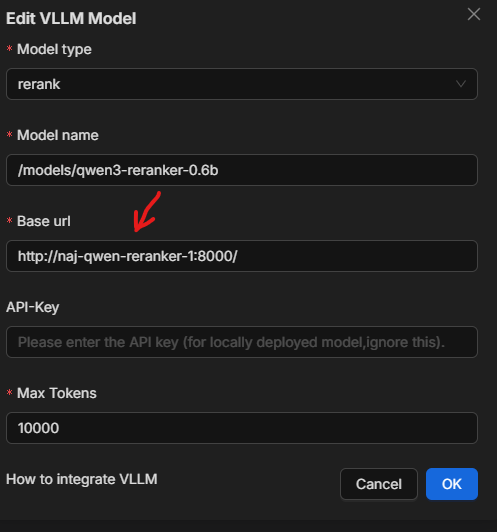
Figure 1: RAGFlow containers communicate with vLLM reranker via internal Docker network docker-ragflow. External access (optional) via port 8123.
—
Verification
From RAGFlow container, test connectivity:
docker exec -it ragflow-server curl http://ragflow-vllm-reranker:8000/v1/models
Expected output:
{
  "object": "list",
  "data": [
    {
      "id": "/models/qwen3-reranker-0.6b",
      ...
    }
  ]
}
—
Benefits of This Setup
Zero external exposure (optional): vLLM accessible only within docker-ragflow network.
Secure & fast internal communication.
Scalable: Add more rerankers, LLMs, or vector DBs on same network.
Portable: Works across dev, staging, production with same config.
—
Troubleshooting Tips
|------|———-| | Connection refused | Check network: docker network inspect docker-ragflow | | Unknown host | Use container name, not localhost | | Port conflict | Ensure no other service uses 8000 inside network | | Model not loading | Verify volume mount and trust-remote-code |
—
Summary
To use vLLM inside RAGFlow Docker environment:
Create network: docker network create docker-ragflow
Connect both RAGFlow and vLLM containers
Use container name in api_base
Enjoy fast, secure, internal reranking
> No need for public IPs, reverse proxies, or complex routing — Docker handles it all.